 11
11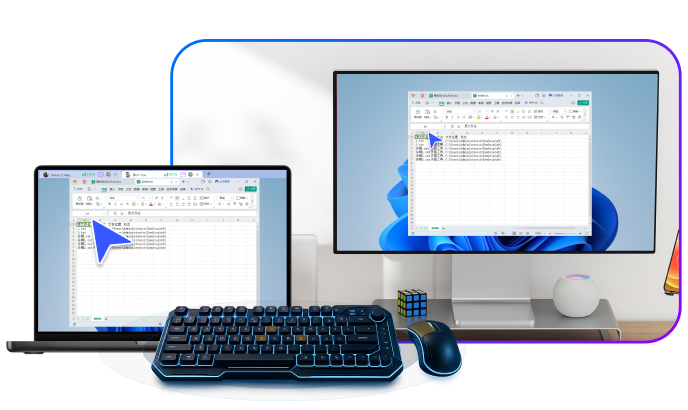
In today’s digital landscape, remote desktop tools have become indispensable for professionals, businesses, and individuals alike. These software solutions enable users to access and control computers or devices from afar, facilitating remote work, technical support, file transfers, and collaboration. With the rise of hybrid work models and global teams, the demand for reliable, secure, and high-performance remote access has skyrocketed. Among the myriad options available, ToDesk emerges as a compelling choice, particularly for users seeking a balance between speed, security, and affordability.
ToDesk, developed by Hainan Youqu Technology Co., Ltd., is a cross-platform remote control software that emphasizes low-latency connections, robust encryption, and versatile features tailored for both personal and enterprise use. Originating from China, it has gained traction for its innovative technologies like the ZeroSync engine and SD-WAN optimization, which promise seamless performance even in challenging network conditions. But how does ToDesk stack up against established players like TeamViewer, AnyDesk, and open-source alternatives such as RustDesk? This article delves into a comprehensive comparison, highlighting key features, strengths, weaknesses, and unique differentiators.
We’ll explore the core functionalities of ToDesk, compare it head-to-head with competitors, and examine what sets it apart in a crowded market. By the end, you’ll have a clear understanding of whether ToDesk is the right tool for your needs. Whether you’re an IT administrator managing fleets of devices, a gamer seeking lag-free remote play, or a remote worker needing quick file access, this analysis aims to provide actionable insights. Let’s break it down step by step.
Remote desktop software has evolved significantly since its inception, transforming from basic screen-sharing utilities to sophisticated platforms with AI integrations, augmented reality support, and enterprise-grade security. At their core, these tools allow one device to view and control another over the internet or a local network, often with additional capabilities like file transfer, chat, and session recording.
Popular tools can be categorized into commercial, freemium, and open-source options. Commercial giants like TeamViewer dominate with extensive features but come at a premium price, often targeting businesses with needs for scalable IT support. AnyDesk focuses on speed and low latency, making it ideal for real-time interactions such as graphic design or gaming. Open-source alternatives like RustDesk appeal to privacy-conscious users who prefer self-hosting and customization without licensing fees.
Key considerations when choosing a remote desktop tool include performance (latency and resolution), security (encryption and access controls), compatibility (cross-platform support), ease of use, and cost. For instance, tools like Chrome Remote Desktop offer simplicity but lack advanced features, while Splashtop provides strong mobile integration. Emerging players like HopToDesk, a fork of RustDesk, emphasize free access with enhancements in mobile support.
In this ecosystem, ToDesk positions itself as a high-performance contender with a focus on professional scenarios. It supports up to 4K resolution at 60fps, multi-monitor setups, and specialized modes for gaming and design. Unlike some competitors, ToDesk offers tiered plans, including a free personal edition and paid versions for gaming, performance, and IT operations. This flexibility allows it to cater to diverse users, from casual home-office setups to enterprise deployments. However, its relative novelty in global markets means it may not have the same brand recognition as TeamViewer, which boasts integrations with Salesforce and SAP.
Overall, the remote desktop market is competitive, with each tool carving out niches based on speed, security, or cost. Understanding these nuances is crucial for selecting the best fit.
ToDesk is a modern remote desktop application designed to provide fast, secure, and reliable access to devices across various platforms. Launched by Hainan Youqu Technology Co., Ltd., it first gained prominence in 2022 with its RTC engine technology, which optimizes real-time communication for minimal latency. By 2025, ToDesk had expanded its capabilities, adding features like a File Center for cross-device access without full remote sessions, and native support for HarmonyOS, making it one of the first tools to integrate with Huawei’s ecosystem.
Primarily aimed at remote work, IT support, and creative professionals, ToDesk stands out for its emphasis on high-fidelity visuals and smooth performance. It uses proprietary technologies such as ZeroSync for ultra-low 3ms latency and supports streaming at 2K 144Hz, which is particularly beneficial for gamers and designers needing accurate color reproduction with 4:4:4 true color mode. The software is available in multiple languages, enhancing its global appeal, and offers end-to-end encryption to ensure data security during sessions.
ToDesk’s user interface is intuitive, with easy setup processes that don’t require complex configurations. Users can connect via ID and password, similar to other tools, and it supports unattended access for always-on devices. For enterprises, it provides team management features in its IT Operations and Technical Editions, including shared devices and real-time monitoring. Priced competitively, the free Personal Edition suffices for basic needs, while premium plans unlock advanced options like dedicated high-speed channels and multi-screen support.
In essence, ToDesk bridges the gap between affordability and professional-grade performance, making it a viable alternative for users tired of overpriced or underperforming options.
ToDesk boasts a rich set of features that cater to a wide array of use cases. At its foundation is high-performance remote access, powered by advanced networking technologies that minimize lag and maximize clarity. For example, its support for 4K resolution at 60fps and 2K at 144Hz ensures fluid visuals, ideal for video editing, 3D modeling, or remote gaming. The 4:4:4 true color display preserves color accuracy, a boon for graphic designers who can’t afford discrepancies in remote sessions.
Security is another pillar, with end-to-end encryption protecting all data transmissions, including screen shares, file transfers, and audio. Features like permission controls and privacy screens (which black out the controlled device’s display) add layers of protection against unauthorized viewing. Cross-platform compatibility is extensive, covering Windows, macOS, Linux, iOS, Android, and even Raspberry Pi in some contexts, though primarily focused on major OSes.
File management is streamlined through the File Center, allowing users to access files across devices under the same account without initiating a full remote connection. This feature simplifies workflows, enabling quick retrieval of documents or media. High-speed file transfers, up to 12MB/s on mobile, further enhance productivity.
For specialized needs, ToDesk offers gamepad support, digitizer tablet compatibility, and virtual displays, which allow extended workspaces even on single-monitor setups. Multi-monitor operation and flexible screen splitting make it suitable for power users. Enterprise editions include team accounts, device sharing, and monitoring tools for IT teams.
Additional perks include real-time audio synchronization, instant messaging during sessions, and automatic delivery for global connectivity. ToDesk’s global network nodes ensure stable connections worldwide, reducing issues in cross-border collaborations. Overall, these features position ToDesk as a versatile tool that goes beyond basic remote access.
TeamViewer is a veteran in the remote desktop space, known for its comprehensive feature set and enterprise focus. It offers remote control, file transfer, session recording, and integrations with CRM systems like Salesforce. However, ToDesk differentiates itself with superior performance metrics, such as lower latency (3ms vs. TeamViewer’s variable 50-100ms in tests) and higher frame rates for demanding tasks.
Pricing is a key battleground: TeamViewer’s commercial licenses start at hundreds of dollars per year, often escalating for add-ons like AR support or RMM tools. In contrast, ToDesk’s free Personal Edition and affordable premium plans (e.g., Gaming Edition) make it more accessible for small teams or individuals. TeamViewer excels in scalability, with AI agents for automated issue resolution, which ToDesk lacks.
Security-wise, both use strong encryption, but TeamViewer’s history of breaches raises concerns, whereas ToDesk’s newer architecture emphasizes privacy from the ground up. For users prioritizing cost and speed over extensive integrations, ToDesk edges out.
AnyDesk is renowned for its lightning-fast connections, leveraging DeskRT codec for low-latency remote access. ToDesk matches this with its ZeroSync protocol, offering comparable 3ms latency and high-resolution support. Both tools are cross-platform and user-friendly, but ToDesk adds specialized features like gamepad support and true color mode, which AnyDesk handles but not as emphasized for creative work.
Cost-wise, AnyDesk’s free version is limited for commercial use, pushing users to paid plans starting at $10/month. ToDesk’s tiered editions provide more granularity, such as a dedicated Gaming plan. AnyDesk has broader global recognition and better mobile apps in some reviews, but ToDesk’s File Center and HarmonyOS support give it an edge in ecosystem integration.
In head-to-head tests, both perform excellently, but ToDesk’s focus on professional remote design and lower pricing for advanced features makes it a strong contender.
RustDesk is an open-source powerhouse, favored for its self-hosting capabilities and zero-cost model. Written in Rust, it offers end-to-end encryption, adaptive bitrate, and support for multiple OSes, including mobile. ToDesk, while not open-source, provides a polished, proprietary experience with features like 4:4:4 color and virtual displays that RustDesk may require custom tweaks for.
RustDesk shines in privacy, allowing users to run their own relay servers to avoid third-party involvement. ToDesk relies on its global nodes but offers enterprise tools like team monitoring, absent in base RustDesk. Performance is similar, with RustDesk’s hardware rendering competing with ToDesk’s high FPS modes.
For tech-savvy users, RustDesk’s customizability is unbeatable, but ToDesk’s ease of use and specialized editions appeal to non-technical audiences. If openness is paramount, RustDesk wins; for out-of-the-box professionalism, ToDesk prevails.
ToDesk differentiates through its blend of high-end performance and accessibility. Its ZeroSync and SD-WAN technologies deliver unmatched low-latency experiences, surpassing many competitors in real-time applications. The tiered pricing model allows users to pay only for what they need, unlike all-or-nothing subscriptions from TeamViewer.
Innovation in features like the File Center and HarmonyOS support positions ToDesk for future-proofing, especially in Asian markets. While it may lack some enterprise integrations, its focus on creative and gaming niches fills gaps left by generalist tools. Ultimately, ToDesk’s value lies in democratizing premium remote access without compromising security or speed.
In the competitive world of remote desktop tools, ToDesk holds its own by offering a unique combination of speed, features, and affordability. While TeamViewer excels in enterprise scalability, AnyDesk in raw speed, and RustDesk in openness, ToDesk’s specialized modes and innovative tech make it ideal for professionals seeking differentiation. If you’re looking for a fresh alternative, ToDesk is worth trying.
ToDesk is a remote desktop software for secure, low-latency access to devices across platforms.
Yes, it offers a free Personal Edition; premium plans unlock advanced features.
Both use encryption, but ToDesk emphasizes privacy screens and has a cleaner security track record.
Yes, with its Gaming Edition supporting 4K, high FPS, and gamepad compatibility.
Absolutely, it works on iOS and Android for control and access.
It runs on Windows, macOS, Linux, and mobile OSes with minimal hardware needs.
It features end-to-end encryption and permission controls for safe sessions.
No, it’s proprietary, unlike open-source options like RustDesk.